MyDeskForge
Gaming Desks in 2026: Depth Is the Spec That Decides

The short answer
- Buy depth, not branding. Of the seven large desks we pulled listings for, six are 24 inches deep and one is 27.6. That single number changes how a 27-inch monitor sits more than anything else on the spec sheet.
- 48 inches is not a two-monitor desk. Two 27-inch screens are about 48 inches of panel on their own. You want 55.
- A $30 monitor arm buys back what a shallow desk takes away. If you are set on a 24-inch-deep desk, budget for the arm in the same order.
- Almost none of these are really "gaming desks." They are ordinary sit-stand frames with a large top, priced $70–$140. That is good news: you can shop on geometry instead of aesthetics.
Search for a gaming desk and you get carbon-fibre vinyl, cup holders, headphone hooks and an RGB strip along the front lip. Almost none of that changes how the setup feels at hour three. What changes it is whether the screen is far enough from your face, and whether your mouse has room to move.
Both of those are geometry, and geometry is checkable. So this article does something slightly unusual for the category: it compares seven large desks on the two dimensions that decide the setup, and largely ignores what they are marketed as.
The depth problem
A 27-inch 16:9 monitor is 23.5 inches wide and 13.2 inches tall. The usual ergonomic guidance is that a screen that size wants somewhere around 25 to 30 inches between your eyes and the panel — far enough to take in the whole screen without scanning, close enough to read comfortably.
Now put that monitor on a 24-inch-deep desk and count backwards:
| Step | 24" desk | 27.6" desk | 24" desk + arm |
|---|---|---|---|
| Desktop depth | 24.0" | 27.6" | 24.0" |
| Lost to the stand | −6" | −6" | 0" |
| Eyes behind the front edge | +5" | +5" | +5" |
| Eye to screen | ≈ 23" | ≈ 27" | ≈ 29" |
Twenty-three inches is not a disaster. It is the low end of workable, and it is why people describe cheap wide desks as "fine, but the screen feels in your face." Three and a half inches of extra depth moves you into the middle of the recommended band instead of under it.
The last column is the reason a monitor arm keeps coming up on this site. An arm clamps at the rear edge and holds the screen out over it, so the six inches the factory stand consumed come straight back — and you can push further still. On depth alone, a 24-inch desk plus a $30 arm beats a 27.6-inch desk with a stock stand. It also frees the space under the screen, which is where most people end up parking a keyboard they are not using.
If you would rather check the numbers against your own body than against our assumptions, the desk height calculator works out seated height, standing height and eye level from a single measurement.
How wide you need for two monitors
Width is simpler arithmetic and people still get it wrong, because desks are sold on width and monitors are sold on diagonal.
- One 27-inch screen: 23.5 inches of panel.
- Two of them side by side: about 48 inches once bezels and stands are counted.
- A low-sensitivity mouse sweep needs roughly 15 inches of clear pad, and that space has to come from somewhere.
So a 48-inch desk holds two 27-inch monitors with essentially nothing left over — no speakers, no room to angle the screens inward, and the mouse living in front of the right-hand panel. A 55-inch desk is the first size where a dual-monitor setup stops feeling like packing a suitcase. If you run one monitor, 48 inches is generous and 47 is plenty.
All 7 compared
Every figure below was read off the live listing on 24 August 2026. Prices in this category move weekly, so treat them as a snapshot rather than a quote.
| Desk | Size | Height | Price | Rating | Ratings | Check |
|---|---|---|---|---|---|---|
 Huuger 55 × 28 Huuger 55 × 28 |
55 × 27.6" | Electric | $139.99 | 595 | Price | |
 Cable-net 55 × 24 Cable-net 55 × 24 |
55 × 24" | Electric | $109.99 | 226 | Price | |
 "Gaming" 48 × 24 "Gaming" 48 × 24 |
48 × 24" | Electric | $99.99 | 144 | Price | |
 Cable-net 48 × 24 Cable-net 48 × 24 |
48 × 24" | Electric | $79.99 | 226 | Price | |
 ErGear 48 × 24 ErGear 48 × 24 |
48 × 24" | Electric | — | 11,804 | Price | |
 Lufeiya 47" + cabinet Lufeiya 47" + cabinet |
47" wide | Fixed | $79.99 | 2,311 | Price | |
 55" fixed desk 55" fixed desk |
55" wide | Fixed | $69.99 | 92 | Price |
Two things stand out. The first is that every electric desk here costs between $70 and $140 — the price gap between a "gaming desk" and a plain sit-stand desk has essentially closed. The second is that the desk with by far the most ratings, the ErGear at 11,804, is also the most anonymous-looking one in the list. Volume of feedback is worth more than styling at this price.
The three worth a closer look

Best geometry
Huuger 55 × 28
The only desk in this group that publishes a depth over 24 inches — the listing states a 27.6-inch desktop. That is the whole argument for it. It is also 55 inches wide, so it is the one desk here that genuinely takes two 27-inch monitors without the setup feeling wedged in.
- Desktop55" × 27.6"
- AdjustmentElectric
- Presets3
- Extras2 hooks
Pros
- 27.6" depth puts a 27" screen at a sane distance on its own stand
- 55" width is real dual-monitor space, not marketing width
- Three memory presets under $150
Cons
- Lowest rating in the group at 4.3
- A 55" desktop is heavy and awkward to assemble alone
- No published weight capacity on the listing
Verdict If you have the wall for it, this is the desk in the group whose numbers actually match a two-monitor gaming setup. The 4.3 average is the one thing to read reviews about before ordering.

Best value
Cable-net 48 × 24
An electric sit-stand desk at eighty dollars, with the one feature on this whole page that is genuinely aimed at a gaming setup: an under-desk cable net. A gaming PC has far more cables than an office laptop, and a desk that ships with somewhere to put them saves you buying a cable tray separately.
- Desktop48" × 24"
- AdjustmentElectric
- Cable managementUnder-desk net
- Larger version55" × 24" at $109.99
Pros
- Cheapest electric desk here, at 4.6 across 226 ratings
- Cable net solves the problem gaming setups actually have
- Same desk exists at 55" if you outgrow it
Cons
- 24" deep — plan on a monitor arm
- 48" is tight for two 27" screens
- No published height range or capacity
Verdict The sensible default for a single-monitor setup. Buy it, spend part of what you saved on a monitor arm, and you end up further ahead on depth than the Huuger.
Most proven
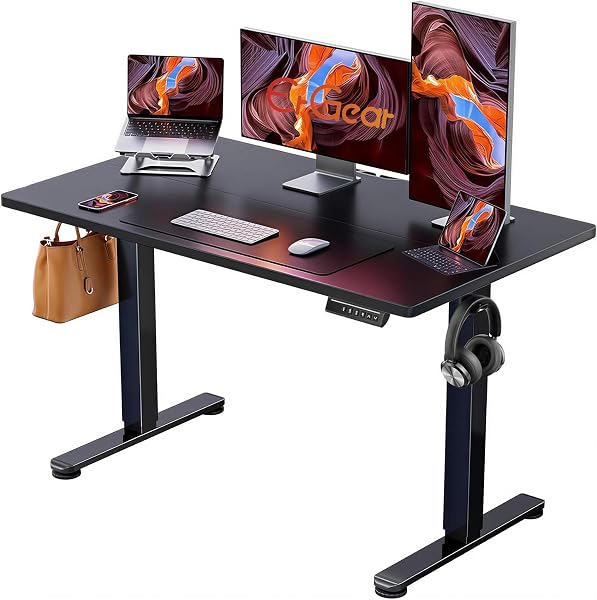
ErGear 48 × 24
Nearly twelve thousand ratings at 4.5. Nothing else in this article is close, and at the budget end of a category full of six-month-old listings, that track record is worth more than any feature on a spec sheet. A desk that was going to fail at the two-year mark tends to show it in a sample that size.
- Desktop48" × 24"
- AdjustmentElectric
- Ratings11,804
- PriceNot shown at capture
Pros
- By far the largest body of customer feedback here
- Established brand with a broader size range
- Plain black top ages better than a printed finish
Cons
- No price showing on the listing when we captured it
- 24" deep, same caveat as the rest
- No cable management included
Verdict The low-risk choice. If the price is close to the others when you look, the rating volume alone makes it the safest order on the page.
What to ignore
- RGB built into the desk. It is fixed to that desktop, driven by that desk's controller, and it lights the wrong thing — the front lip, into your eyes. A bias light behind the monitor costs a fraction as much, cuts contrast fatigue instead of adding glare, and moves with you.
- Carbon-fibre vinyl wraps. A printed film over particle board. It lifts at the edges where your forearms rest, usually within a year. A plain laminate top and a large desk pad looks better and stays looking that way.
- Cup holders and hooks bolted to the frame. Fine if they are free. Never worth a price difference — a $9 clamp-on hook does the same job and goes where you want it.
- The word "gaming" in the title. On this page it appears on a desk that is dimensionally identical to two desks that do not use it, and $20 more than one of them.
What is worth paying for, in order: depth, then width, then a way to route cables, then height adjustment. Everything after that is decoration.
Once the desk is chosen, the setup planner lays out a monitor, chair and lamp against your room dimensions, and the setup checklist covers the order to adjust everything in.
Frequently asked questions
How deep should a gaming desk be?
Around 28–30 inches if the monitor sits on its factory stand. A 27-inch screen wants roughly 25–30 inches from your eyes, and the stand alone consumes about six inches of depth. On a 24-inch desk you land nearer 23. A monitor arm clamped at the back edge recovers most of the difference for about $30.
How wide does a desk need to be for two monitors?
Two 27-inch 16:9 screens are roughly 48 inches of panel and bezel together. A 48-inch desk fits them and nothing else. Fifty-five inches is the first width that leaves room to angle them inward and still put speakers somewhere.
Is a gaming desk different from a standing desk?
Usually only in the top. The frames at this price are the same ones used for office desks, with a themed desktop fitted. That is why a large plain sit-stand desk is often the better buy — same frame, better-ageing surface, more sizes. Our standing desk roundup covers the tier above these.
Do cheap electric standing desks wobble when you play?
At seated height, rarely. Wobble grows with height and with what is on top, so a desk at full standing height carrying two monitors is the worst case and a seated desk with one screen is close to the best. If you mostly game seated, the single-motor frames here are less of a compromise than they look.
How we assessed this
- Researched, not tested. Nobody at MyDeskForge has assembled these seven desks. This article is built from listing data, published specifications and customer ratings recorded on 24 August 2026.
- The depth and width arithmetic is arithmetic, not measurement. It assumes a 27-inch 16:9 panel, a stand base consuming about six inches of desktop, and eyes sitting about five inches behind the desk's front edge. Your own numbers will vary; the method is the useful part.
- Where a listing did not publish a figure — height range, capacity, current price — the cell is left empty rather than filled with an estimate.
- Our full-size roundup covers desks that were assembled and used. We keep the two labelled so you always know which kind of article you are reading.